This page is in English. The application interface shown in recordings and some controls is currently in Spanish.

New team AI for architects

Your practice.
A bigger
team.

17 AI employees to help with reports, drawings, 3D and the day-to-day work of your practice.

Developed with Pablo Sabariegos
By an architect, for architects.

Start free with 200 credits. No card needed.

Your next practice

17 colleagues
Choose a character to discover their work
A shared foundation. Your own practice.
17 specialised colleaguesReports · drawings · 3D · videoMade in Spain, with you

People in charge. AI as a team.

Every task has
its teammate.

They start with a role, procedures and tools. You provide the judgement and adapt them to the way you work.

Project

Nea

Reports and project documentation

Continues the project report, gathers missing information and keeps the project documents connected.

Start with something like this

“Let's continue the report using this template. Tell me what information you need and preserve its formatting.”

You can change the name and personalise the instructions.

01 · A project in progress

From a drawing
to a new perspective.

Work with documents, drawings and models in the same environment. Request a review, prepare a view and keep the file to continue developing it.

  • Drawings, layers and sheets with Leo
  • Modelling and visualisation with Maya
  • Project reports that develop with Nea

This video shows a real journey from drawing to model and image. Technical review of the project remains your responsibility.

Real Iabot recording Open video

02 · Your workspace

A complete environment.
To keep moving forward.

A virtual computer for your practice, organised documents and working applications. Access it through your browser and continue with your employees.

Real recording of applications and configuration. Each external connection is set up with your permissions.

Real Iabot recording Open video
YOUR COMPUTER

A workspace
in the cloud.

Applications and files on the practice's virtual computer. Your employees can work there with you.

4 vCPU8 GiB RAM10 GiB disk
Official Blender logoBLENDER INSTALLED

Model, prepare
and visualise.

The computer includes Blender, LibreCAD, FreeCAD and LibreOffice. Keep your models and documents editable.

Real working tools
COMFYUI + GPU

Images that open up
possibilities.

Create images, animate references and prepare clips, music or voiceovers with supported ComfyUI workflows and the remote GPU.

Image · video · audio
HYPERFRAMES + GPU

Your project,
in motion.

Edit and compose videos with scenes, titles, logos and audio. Prepare an editable composition and export the MP4 using GPU rendering.

Composition · editing · rendering

Included in Full practice. Computer and GPU jobs consume credits based on usage; you can review consumption in your account.

From the task to the next step

Fewer loose ends.
More connected work.

The team shares a working approach: ask for missing information, retain sources and leave results ready for review.

01 / DOCUMENTATION

Your project report
keeps developing.

An editable template, document structure and procedures to gather data, identify pending items and preserve the project's format.

PROJECT REPORT01. Descriptive report

Completed information

Information awaiting confirmationIllustrative template preview
02 / VISUALISATION

Explore, compare
and present.

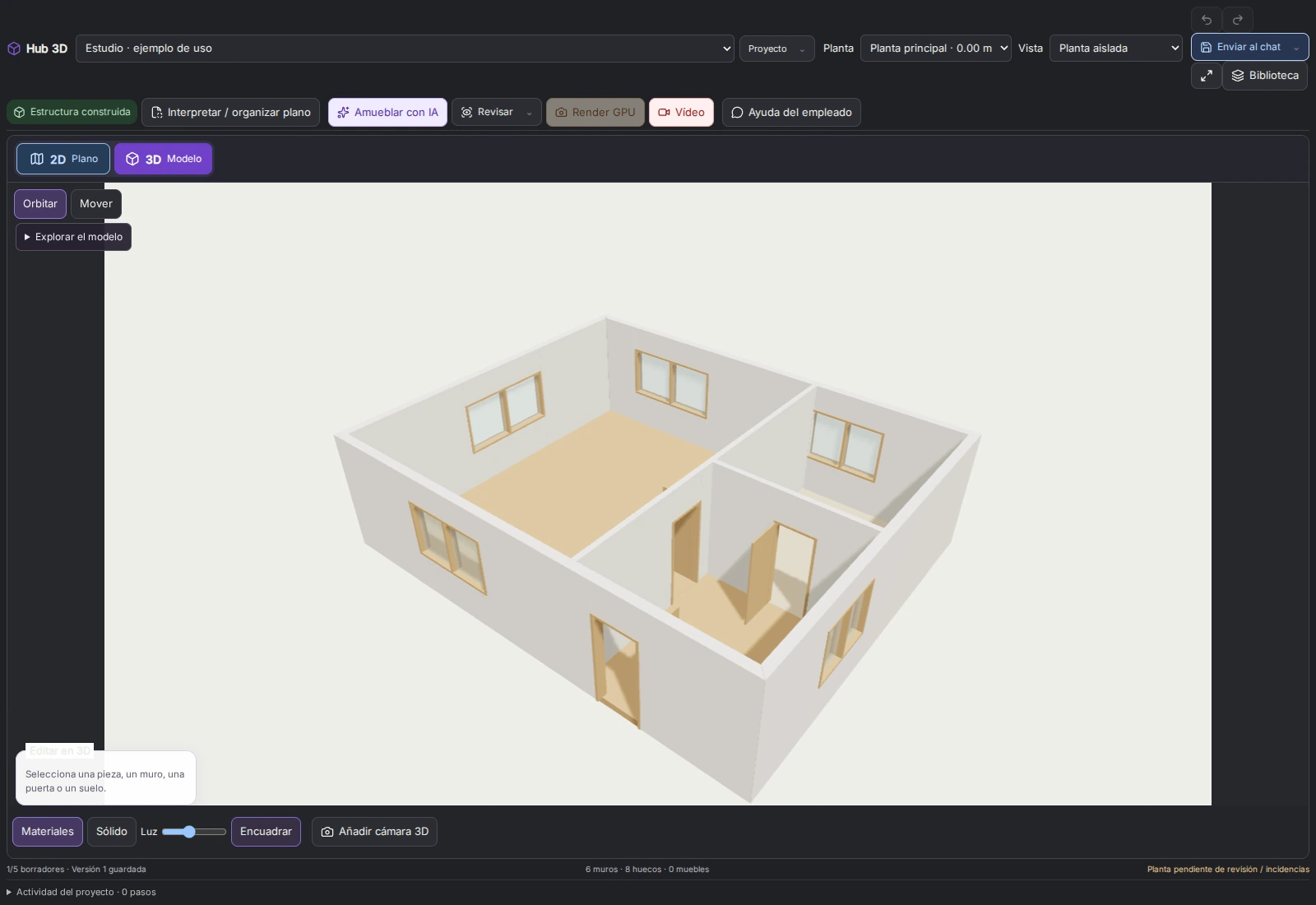
Drawings, 3D models, materials and project views. Prepare editable files and visual representations to assess each decision.

Real Iabot 3D interface showing an architectural project
03 / AUDIOVISUAL CREATION

From an idea
to a finished piece.

ComfyUI for images, clips, music and voiceovers. HyperFrames to compose a video using text, assets and your practice's identity.

ImageClipComposition

Remote graphics power for supported jobs.Usage is recorded against your credits.

Avatar of Pablo Sabariegos's assistant
By an architect, for architects

Technology,
with someone alongside you.

Developed with architect Pablo Sabariegos. A template built around the practice's work, evolving as it is used.

Pablo's assistant, inside the practice

A space reserved for its upcoming video demonstration. Meanwhile, explore the two real recordings on this page.

A Spanish team alongside you

You don't have to
figure everything out alone.

Get technical advice, technical support and guidance to take your first steps and adapt the environment to your practice.

01
Getting started

We help you understand the team and set up your working approach.

02
Configuration and tools

Guidance on applications, your documents and the connections you choose to use.

03
Architectural judgement

A foundation developed with an architect, centred on your review and decisions.

Talk to the team

Your team starts here

Try it for free.
Give it room to work.

Choose how to start. When you move from the trial to a subscription, you keep your team and its configuration.

Get to know the team

Free trial

€0

17 specialised employees to start conversations and prepare your first tasks.

  • 200 welcome credits, awarded once
  • Team, procedures and document template
  • Personalise names and instructions
  • No card or automatic subscription

No virtual computer or GPU services.

Try my team for free
With Pablo's code 50% off the first month

Work with the full environment

Full practice

€124.50for the first month with PABLO50

Then, €249/month. No minimum term.

  • All 17 employees, procedures and templates
  • 27,500 credits every month, including the first
  • Virtual computer: 4 vCPU · 8 GiB RAM · 10 GiB
  • LibreCAD, FreeCAD, Blender and LibreOffice
  • Iabot 3D, ComfyUI and HyperFrames GPU services
  • Technical advice and guidance
Thanks to PabloPABLO50
Subscribe with PABLO50

The discount is confirmed before payment. IGIC tax included where applicable.

Included capabilities, with visible usage. AI, computer and GPU jobs consume credits based on usage. Check your balance and add credits from your account.

You choose how long. Cancel whenever you like and retain paid access until the end of the period you have paid for. The code applies to the first Architecture subscription month, not credit top-ups.

Before you start

What you want to know.

What does the free trial include?

All 17 team employees, their procedures and templates, and 200 welcome credits awarded once. You can chat with them and explore their work. It does not include a virtual computer or GPU services.

What changes when I subscribe?

You get the virtual computer with 4 vCPU, 8 GiB RAM and 10 GiB disk, its applications and access to supported GPU services. The plan provides 27,500 credits each month. You keep your team and everything configured during the trial.

How does PABLO50 work?

When subscribing to Iabot Architecture, PABLO50 gives 50% off the first month: €124.50 instead of €249. It then renews at €249/month. The promotion does not reduce the first month's credits and does not apply to top-ups.

Is there a minimum term?

No. Cancel from your account whenever you like. Paid access continues until the end of the period you have paid for and then does not renew.

Is computer and GPU use unlimited?

The plan includes access to the tools and 27,500 monthly credits. AI models, the computer and GPU jobs consume credits based on usage. Review consumption in your account and add credit when needed.

Can I adapt the team to my practice?

Yes. Change names, configure instructions and provide your own documents and procedures. Email, storage and other application connections are set up with your permissions.

Does it replace the architect's review?

The team helps research, prepare, model and organise. Professional judgement, decisions and project review remain in your hands.

Support for your next project

The practice stays yours.
The possibilities grow.